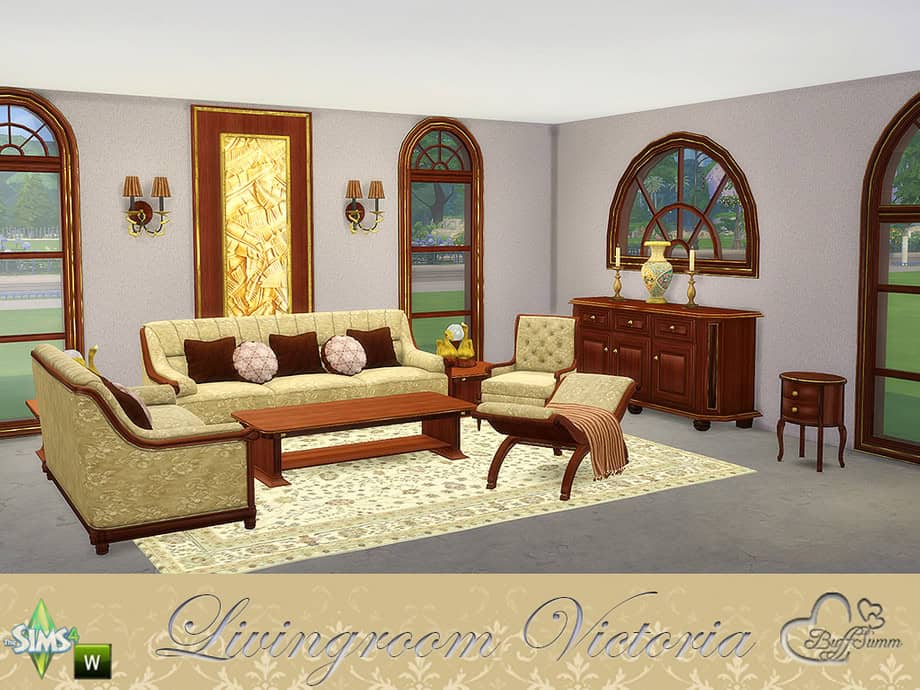
About This Mod
This Victorian living room set mixes wood, metal accents, and soft upholstery to create a warm, historic aesthetic. The collection includes fourteen new objects, such as a sofa, a loveseat, a living chair, and a coffee table. You’ll also get end tables, a sideboard, benches, and small décor pieces. With these beautiful pieces, you can build a full period-style sitting room, decorate parlors, or mix single pieces into modern homes for contrast. Everything is base-game compatible and found in Build/Buy. RELATED POST: Top Sims 4 Cozy Living Room CC for Fall 2025: Furniture and Decor
How to Install
Follow these steps to install Living Room Victoria on your Sims 4 game:
- 1
Download the mod file from the link above. Sims 4 mods typically come as .package or .ts4script files.
- 2
Open your Sims 4 Mods folder. The default location is: Documents/Electronic Arts/The Sims 4/Mods
- 3
Place the downloaded file directly into the Mods folder. You can organize mods into subfolders up to one level deep.
- 4
Launch The Sims 4 and go to Game Options > Other. Make sure "Enable Custom Content and Mods" is checked.
- 5
Restart the game if it was already running. The mod should now appear in your game.
Important: Always back up your save files before installing new mods. After Sims 4 updates, mods may need to be re-downloaded or updated by the creator.
Compatibility
Platform
The Sims 4 (PC/Mac)
Requirements
- •Custom Content and Mods must be enabled in Game Options > Other
- •Script mods (.ts4script files) require "Script Mods Allowed" to be enabled separately
- •After each Sims 4 game update, some mods may need to be updated by the creator
Pro tip: If a mod stops working after a game update, check the creator's page for an updated version. Broken mods can cause the game to behave unexpectedly.
Frequently Asked Questions
More from Creator
You Might Also Like
Living Room Victoria
Created by
BuffSumm
0 ratings
downloads
favorites
views
Additional Information
Published
November 27, 2025
Source
MustHaveMods.com
Last Updated
April 29, 2026