Save this find
Create a free account and this mod is saved to your favorites.
About This Mod
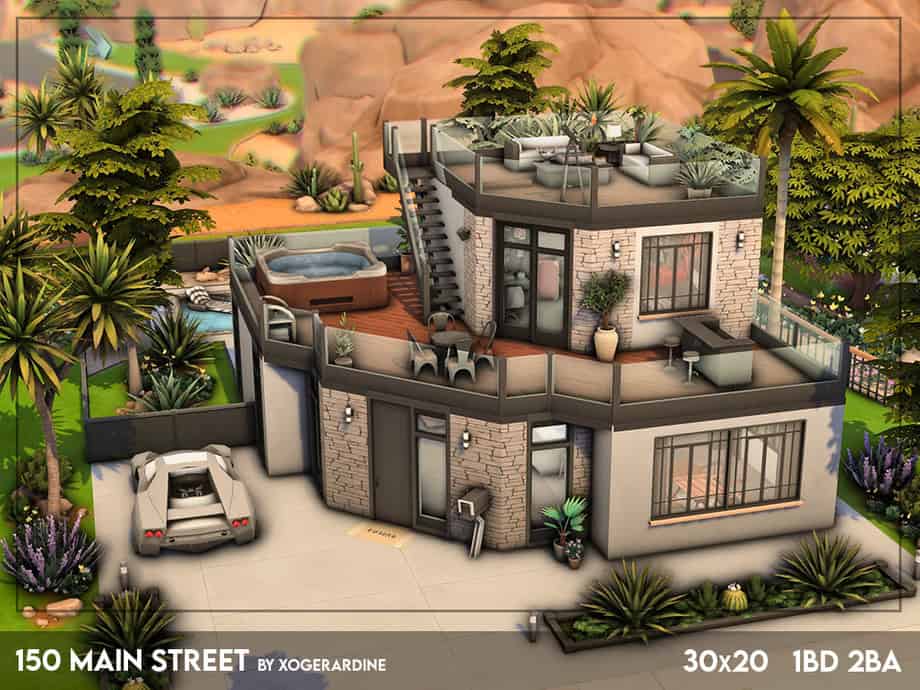
This renovated desert condo is inspired by Don Lothario’s classic Sims 2 home. The new design transforms it into a warm, modern retreat perfect for single Sims or young couples. The build features an upgraded exterior with stone textures, expansive windows, and a fully refreshed layout to keep the original vibe while adding more personality and living space. The house also comes with one bedroom and two bathrooms, plus an airy living area and an updated kitchen. The backyard is the real highlight, offering players a compact pool, sun loungers, and lush landscaping. Note that it sits on a 30×20 lot and is fully furnished.
How to Install
Follow these steps to install 150 Main Street on your Sims 4 game:
- 1
Download the mod file from the link above. Sims 4 mods typically come as .package or .ts4script files.
- 2
Open your Sims 4 Mods folder. The default location is: Documents/Electronic Arts/The Sims 4/Mods
- 3
Place the downloaded file directly into the Mods folder. You can organize mods into subfolders up to one level deep.
- 4
Launch The Sims 4 and go to Game Options > Other. Make sure "Enable Custom Content and Mods" is checked.
- 5
Restart the game if it was already running. The mod should now appear in your game.
Important: Always back up your save files before installing new mods. After Sims 4 updates, mods may need to be re-downloaded or updated by the creator.
Compatibility
Platform
The Sims 4 (PC/Mac)
Requirements
- •Custom Content and Mods must be enabled in Game Options > Other
- •Script mods (.ts4script files) require "Script Mods Allowed" to be enabled separately
- •After each Sims 4 game update, some mods may need to be updated by the creator
Pro tip: If a mod stops working after a game update, check the creator's page for an updated version. Broken mods can cause the game to behave unexpectedly.
Frequently Asked Questions
More from xogerardine
You Might Also Like
150 Main Street
Created by
0 ratings
downloads
favorites
views
Additional Information
Published
January 7, 2026
Source
MustHaveMods.com
Last Updated
November 20, 2026