Save this find
Create a free account and this mod is saved to your favorites.
About This Mod
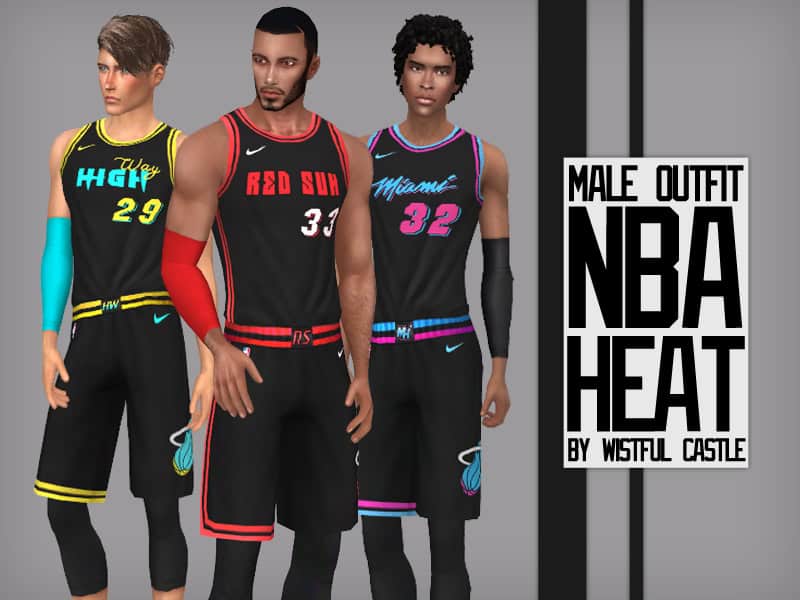
Since the Miami Heat has always been my favorite team, I couldn’t resist including this NBA Heat outfit for male Sims in the list. This sporty set captures the energy of the court with sleeveless jerseys and matching shorts, available in 3 swatches to reflect bold team-inspired colors. Designed for teens to elders, the outfit is perfect for Sims who love basketball, athletic gameplay, or just rocking a sporty streetwear vibe. If you want more athletic outfits, check out our piece on Sims 4 Gym Clothes CC
How to Install
Follow these steps to install NBA Heat Male Outfit on your Sims 4 game:
- 1
Download the mod file from the link above. Sims 4 mods typically come as .package or .ts4script files.
- 2
Open your Sims 4 Mods folder. The default location is: Documents/Electronic Arts/The Sims 4/Mods
- 3
Place the downloaded file directly into the Mods folder. You can organize mods into subfolders up to one level deep.
- 4
Launch The Sims 4 and go to Game Options > Other. Make sure "Enable Custom Content and Mods" is checked.
- 5
Restart the game if it was already running. The mod should now appear in your game.
Important: Always back up your save files before installing new mods. After Sims 4 updates, mods may need to be re-downloaded or updated by the creator.
Compatibility
Platform
The Sims 4 (PC/Mac)
Requirements
- •Custom Content and Mods must be enabled in Game Options > Other
- •Script mods (.ts4script files) require "Script Mods Allowed" to be enabled separately
- •After each Sims 4 game update, some mods may need to be updated by the creator
Pro tip: If a mod stops working after a game update, check the creator's page for an updated version. Broken mods can cause the game to behave unexpectedly.
Frequently Asked Questions
More from Wistful Castle

You Might Also Like
NBA Heat Male Outfit
Created by
0 ratings
downloads
favorites
views
Additional Information
Published
January 13, 2026
Source
MustHaveMods.com
Last Updated
January 25, 2026