Also in:Witch CC
Save this find
Create a free account and this mod is saved to your favorites.
About This Mod
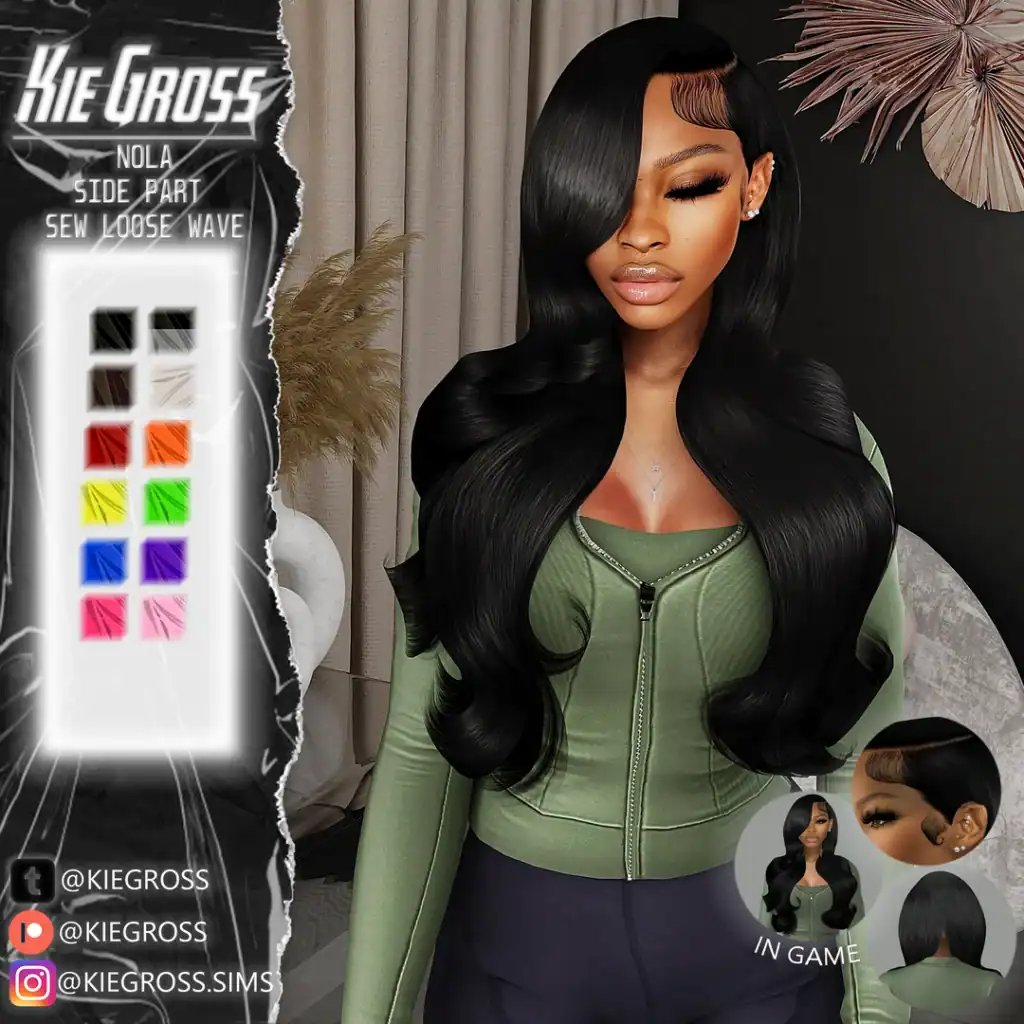
The Nola & Petra hairstyles are designed by KieGross, one of the best Sims 4 urban cc creators in the community. Petra is a sleek, quick-weave style with soft volume and a clean finish, while Nola is a side-part sew-in loose wave with flowing length and a naturally styled silhouette. Both hairs are designed to frame the face beautifully and work well for casual, workwear, or elevated city outfits. The hair comes in 12 swatches and includes a switch option for added styling flexibility. Created with a fully custom mesh, the set includes a custom thumbnail and is available for adult-to-elder Sims. RELATED POST: Sims 4 Lace Front CC
How to Install
Follow these steps to install Nola & Petra Hair on your Sims 4 game:
- 1
Download the mod file from the link above. Sims 4 mods typically come as .package or .ts4script files.
- 2
Open your Sims 4 Mods folder. The default location is: Documents/Electronic Arts/The Sims 4/Mods
- 3
Place the downloaded file directly into the Mods folder. You can organize mods into subfolders up to one level deep.
- 4
Launch The Sims 4 and go to Game Options > Other. Make sure "Enable Custom Content and Mods" is checked.
- 5
Restart the game if it was already running. The mod should now appear in your game.
Important: Always back up your save files before installing new mods. After Sims 4 updates, mods may need to be re-downloaded or updated by the creator.
Compatibility
Platform
The Sims 4 (PC/Mac)
Requirements
- •Custom Content and Mods must be enabled in Game Options > Other
- •Script mods (.ts4script files) require "Script Mods Allowed" to be enabled separately
- •After each Sims 4 game update, some mods may need to be updated by the creator
Pro tip: If a mod stops working after a game update, check the creator's page for an updated version. Broken mods can cause the game to behave unexpectedly.
Frequently Asked Questions
You Might Also Like
Nola & Petra Hair
Created by
KieGross
0 ratings
downloads
favorites
views
Additional Information
Published
December 11, 2025
Source
MustHaveMods.com
Last Updated
October 17, 2026