About This Mod
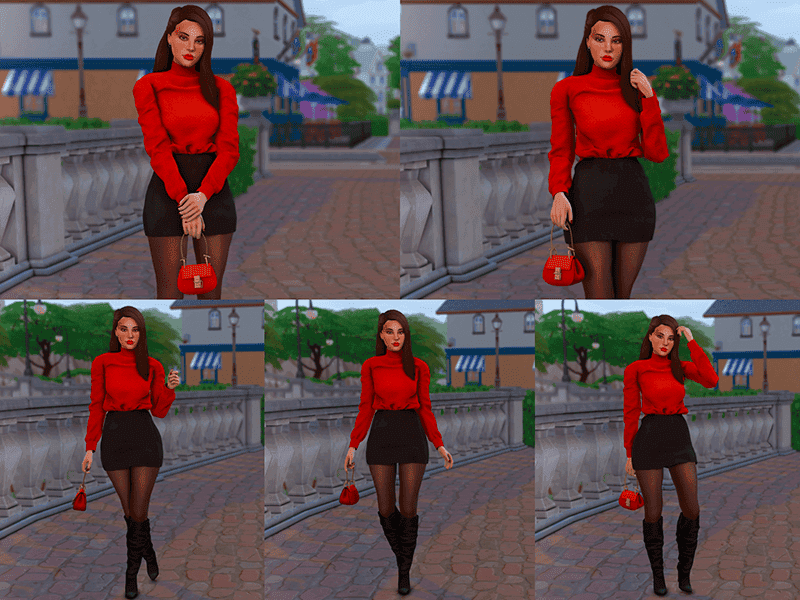
If you’re looking for clean, handbag-focused CAS poses, check out the Pose Pack 34 CAS. This pack includes 5 poses designed to replace the Kleptomaniac trait in CAS. I highly recommend using these Sims 4 handbag poses for outfit previews or quick lookbook shots. You’ll need the Drew Hand Bag for the poses, though they still hold up nicely even without a bag equipped.
How to Install
Follow these steps to install Pose Pack 34 CAS on your Sims 4 game:
- 1
Download the mod file from the link above. Sims 4 mods typically come as .package or .ts4script files.
- 2
Open your Sims 4 Mods folder. The default location is: Documents/Electronic Arts/The Sims 4/Mods
- 3
Place the downloaded file directly into the Mods folder. You can organize mods into subfolders up to one level deep.
- 4
Launch The Sims 4 and go to Game Options > Other. Make sure "Enable Custom Content and Mods" is checked.
- 5
Restart the game if it was already running. The mod should now appear in your game.
Important: Always back up your save files before installing new mods. After Sims 4 updates, mods may need to be re-downloaded or updated by the creator.
Compatibility
Platform
The Sims 4 (PC/Mac)
Requirements
- •Custom Content and Mods must be enabled in Game Options > Other
- •Script mods (.ts4script files) require "Script Mods Allowed" to be enabled separately
- •After each Sims 4 game update, some mods may need to be updated by the creator
Pro tip: If a mod stops working after a game update, check the creator's page for an updated version. Broken mods can cause the game to behave unexpectedly.
Frequently Asked Questions
More from Creator
You Might Also Like
Pose Pack 34 CAS
Created by
Katversecc
0 ratings
downloads
favorites
views
Additional Information
Published
March 27, 2026
Source
MustHaveMods.com
Last Updated
April 28, 2026