Also in:Witch CC
Save this find
Create a free account and this mod is saved to your favorites.
About This Mod
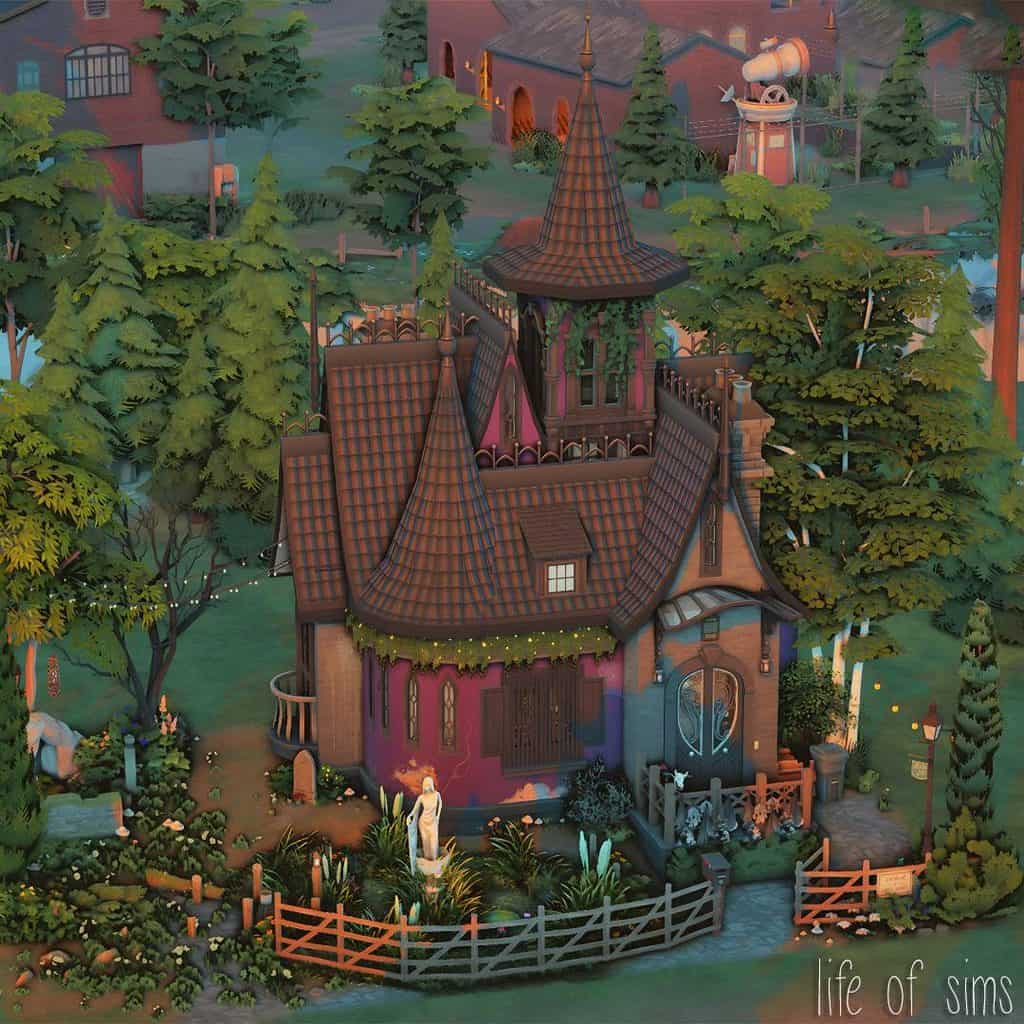
The Witch’s House is a colorful, fairytale-inspired home designed for magical gameplay. It has tall, pointed towers, curved roofs, arched windows, and a mix of pink and blue exterior walls. The unusual roof design and decorative details make it look like something straight out of a fantasy storybook. Despite its compact appearance, the house has enough room for everyday activities. It comes with a living room, an open-plan kitchen, a bedroom with a computer, and a bathroom. This Sims 4 witch house is fully functional and playtested. It fits on the 20×15 New Moon Shack lot in Moonwood Mill. Keep in mind the build uses content from multiple DLC packs, so some objects may be missing or replaced if you don’t own the required packs. Your house may look different from the original screenshots if you don’t have most of the DLC used in the build.
How to Install
Follow these steps to install The Witch’s House on your Sims 4 game:
- 1
Download the mod file from the link above. Sims 4 mods typically come as .package or .ts4script files.
- 2
Open your Sims 4 Mods folder. The default location is: Documents/Electronic Arts/The Sims 4/Mods
- 3
Place the downloaded file directly into the Mods folder. You can organize mods into subfolders up to one level deep.
- 4
Launch The Sims 4 and go to Game Options > Other. Make sure "Enable Custom Content and Mods" is checked.
- 5
Restart the game if it was already running. The mod should now appear in your game.
Important: Always back up your save files before installing new mods. After Sims 4 updates, mods may need to be re-downloaded or updated by the creator.
Compatibility
Platform
The Sims 4 (PC/Mac)
Requirements
- •Custom Content and Mods must be enabled in Game Options > Other
- •Script mods (.ts4script files) require "Script Mods Allowed" to be enabled separately
- •After each Sims 4 game update, some mods may need to be updated by the creator
Pro tip: If a mod stops working after a game update, check the creator's page for an updated version. Broken mods can cause the game to behave unexpectedly.
Frequently Asked Questions
More from lifeofsims

You Might Also Like
The Witch’s House
Created by
lifeofsims
0 ratings
downloads
favorites
views
Additional Information
Published
October 23, 2026
Source
MustHaveMods.com
Last Updated
November 17, 2026