Also in:Clothes CC
Save this find
Create a free account and this mod is saved to your favorites.
About This Mod
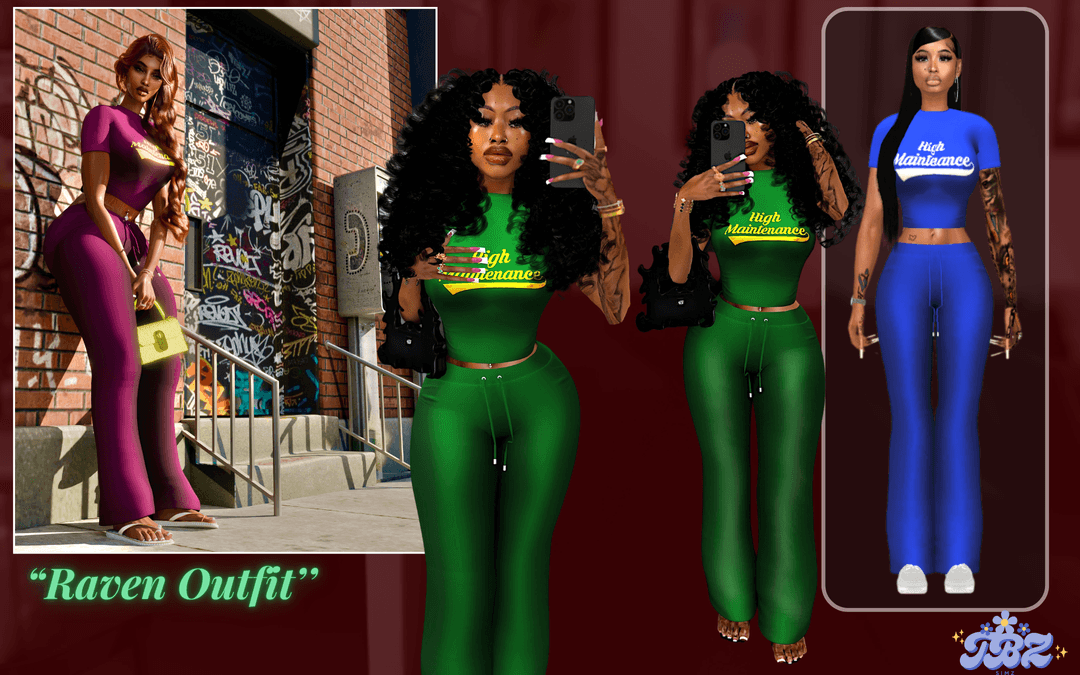
If you want to create a Sims 4 baddie who always has their hair and nails done, you need the right outfit for them. My go-to is this two-piece set, which features a fitted cropped tee with “High Maintenance” printed across the chest and a pair of high-waisted, body-hugging drawstring pants. The outfit comes in a range of vibrant colors, like deep green, royal blue, and purple. You can pair the two-piece with chunky heels, hoops, and a designer bag for that Instagram baddie look. If you’re interested in more baddie custom content, check out our article on Sims 4 Baddie CC.
How to Install
Follow these steps to install Raven Outfit on your Sims 4 game:
- 1
Download the mod file from the link above. Sims 4 mods typically come as .package or .ts4script files.
- 2
Open your Sims 4 Mods folder. The default location is: Documents/Electronic Arts/The Sims 4/Mods
- 3
Place the downloaded file directly into the Mods folder. You can organize mods into subfolders up to one level deep.
- 4
Launch The Sims 4 and go to Game Options > Other. Make sure "Enable Custom Content and Mods" is checked.
- 5
Restart the game if it was already running. The mod should now appear in your game.
Important: Always back up your save files before installing new mods. After Sims 4 updates, mods may need to be re-downloaded or updated by the creator.
Compatibility
Platform
The Sims 4 (PC/Mac)
Requirements
- •Custom Content and Mods must be enabled in Game Options > Other
- •Script mods (.ts4script files) require "Script Mods Allowed" to be enabled separately
- •After each Sims 4 game update, some mods may need to be updated by the creator
Pro tip: If a mod stops working after a game update, check the creator's page for an updated version. Broken mods can cause the game to behave unexpectedly.
Frequently Asked Questions
You Might Also Like
Raven Outfit
Created by
Raven Outfit 111841745
0 ratings
downloads
favorites
views
Additional Information
Published
December 19, 2025
Source
MustHaveMods.com
Last Updated
October 26, 2026