Also in:Build CC
Save this find
Create a free account and this mod is saved to your favorites.
About This Mod
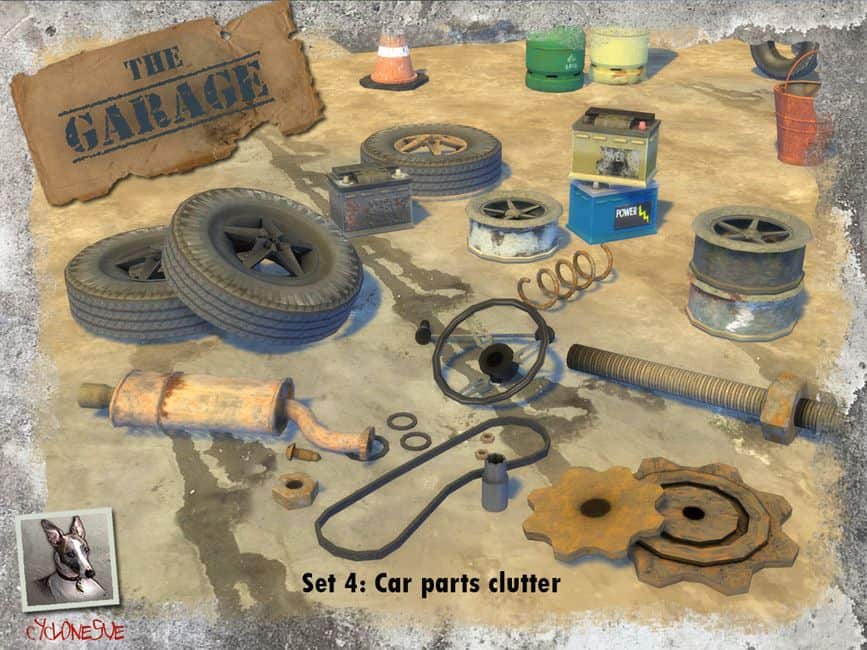
Fan-belt gaskets and nuts
This is Step A of the build-Your-Car kit. Decorative only, and utter garbage. Enjoy!
Car Battery
12 volts of pure nothing, but stackable so you can really annoy Sims with piles of dead batteries.
Old exhaust box
It never will find its way to the garbage pile. Also available in 'shiny' colour if you're that way inclined.
Old gears
Rusty and useless, but essential all the same. Clutter for your Sims' perfect yard.
Pipe with nut
Not wishing to make personal remarks, but this is actually just a big pipe with a big nut - purpose is as yet unclear.
An old spring
Please send your ideas for a description to me. It's just a spring. nothing more to be said, except that it's in 3 colours.
Gear Stick and Steering Wheel
Gear stick or shift stick? Doesn't matter because it's broken anyway, as is the steering wheel. Maybe it will make a nice planter instead!
Stackable spare wheel
More garbage for your pretty yard.
Two piled wheels
More aesthetically pleasing than just one. More decorative garbage for your yard.
Stackable wheel rims
Horrible to behold, so fill your yard with these decorative-only wheel rims.
How to Install
Follow these steps to install Sims 4 Car Clutter CC on your Sims 4 game:
- 1
Download the mod file from the link above. Sims 4 mods typically come as .package or .ts4script files.
- 2
Open your Sims 4 Mods folder. The default location is: Documents/Electronic Arts/The Sims 4/Mods
- 3
Place the downloaded file directly into the Mods folder. You can organize mods into subfolders up to one level deep.
- 4
Launch The Sims 4 and go to Game Options > Other. Make sure "Enable Custom Content and Mods" is checked.
- 5
Restart the game if it was already running. The mod should now appear in your game.
Important: Always back up your save files before installing new mods. After Sims 4 updates, mods may need to be re-downloaded or updated by the creator.
Compatibility
Platform
The Sims 4 (PC/Mac)
Requirements
- •Custom Content and Mods must be enabled in Game Options > Other
- •Script mods (.ts4script files) require "Script Mods Allowed" to be enabled separately
- •After each Sims 4 game update, some mods may need to be updated by the creator
Pro tip: If a mod stops working after a game update, check the creator's page for an updated version. Broken mods can cause the game to behave unexpectedly.
Frequently Asked Questions
More from Cyclonesue
You Might Also Like
Sims 4 Car Clutter CC
Created by
Cyclonesue
0 ratings
downloads
favorites
views
Additional Information
Published
January 25, 2026
Source
TheSimsResource
Last Updated
October 27, 2026