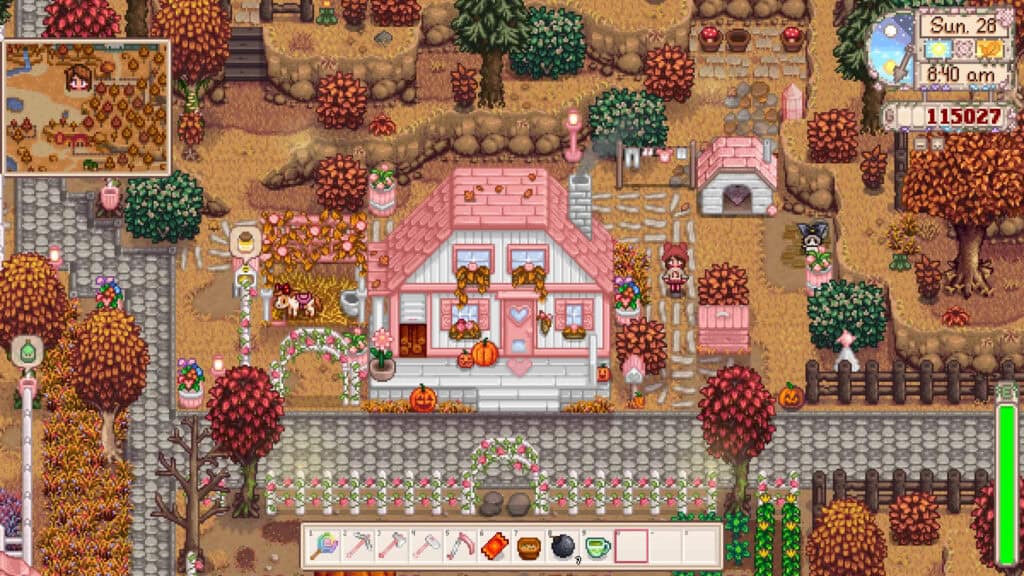
About This Mod
This mod was last updated on 04 December 2024. It’s compatible with the latest Stardew Valley version One of the best visual Stardew Valley mods for transforming your game into a whimsical and fairytale land is Cute Valley. This charming visual overhaul gives Pelican Town a softer, more whimsical look without completely straying from the game’s original style. The mod gently recolors terrain, foliage, and environmental details using lighter, pastel-leaning tones, like pink. This makes the entire valley feel brighter and more storybook-like. Despite the cuter palette, the visuals remain clean and cohesive, so it doesn’t clash with most popular mods. Many players pair Cute Valley with seasonal and building overhauls to create a cozy cottagecore aesthetic across their save. This is undoubtedly one of my favorite mods to use in 2026!
How to Install
Follow these steps to install Cute Valley on your Stardew Valley game:
- 1
Download and install SMAPI (Stardew Modding API) if you haven't already — it's required for most Stardew Valley mods.
- 2
Download the mod file from the link above. It will typically be a .zip file.
- 3
Extract the .zip file into your Stardew Valley "Mods" folder, usually located at: Steam/steamapps/common/Stardew Valley/Mods
- 4
Launch Stardew Valley through SMAPI instead of the normal launcher to activate mods.
- 5
Check the SMAPI console window when the game loads — it will confirm if the mod loaded successfully.
Important: Always back up your save files before installing new mods. Keep SMAPI updated to the latest version for the best mod compatibility.
Compatibility
Platform
Stardew Valley (PC/Mac/Linux)
Requirements
- •Requires SMAPI (Stardew Modding API) — the standard mod loader for Stardew Valley
- •Check if the mod requires Content Patcher or other framework mods
- •Verify compatibility with your Stardew Valley version
Pro tip: Some visual mods may conflict with each other. If you notice graphical issues, try disabling recently added mods one at a time.
Frequently Asked Questions
More from Creator
You Might Also Like
Get the best new Sims 4 mods weekly
New CC drops, curated finds, and free mod roundups — straight to your inbox.
Cute Valley
Created by
Rosalie
0 ratings
downloads
favorites
views
Additional Information
Published
February 27, 2026
Source
MustHaveMods.com
Last Updated
August 9, 2026