Save this find
Create a free account and this mod is saved to your favorites.
About This Mod
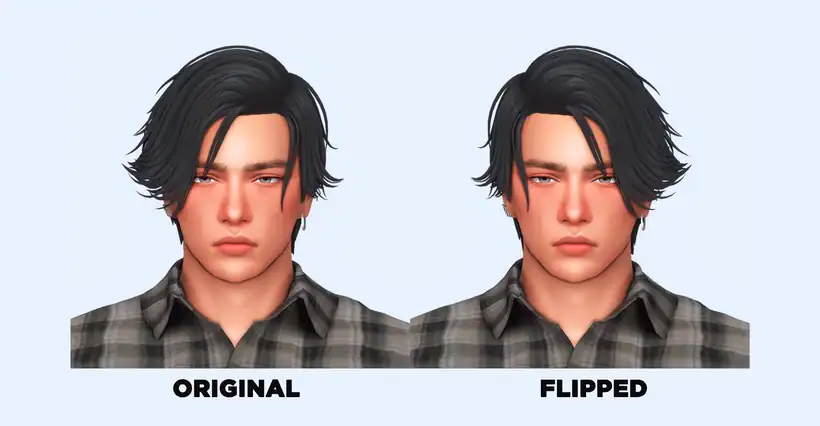
Sanjay Hair is a layered medium-length hairstyle with soft volume and a natural side sweep. The strands fall slightly over the forehead while the sides taper around the ears, giving the style a relaxed, modern look. The hair also comes with both an original and flipped version, allowing you to choose which direction the part falls. This hair includes 24 swatches and works for both masculine and feminine frames, aged from teens to elders. Note that it’s compatible with hats. At the moment, the download is locked and only accessible to the creator’s Patreon supporters.
How to Install
Follow these steps to install Sanjay Hair on your Sims 4 game:
- 1
Download the mod file from the link above. Sims 4 mods typically come as .package or .ts4script files.
- 2
Open your Sims 4 Mods folder. The default location is: Documents/Electronic Arts/The Sims 4/Mods
- 3
Place the downloaded file directly into the Mods folder. You can organize mods into subfolders up to one level deep.
- 4
Launch The Sims 4 and go to Game Options > Other. Make sure "Enable Custom Content and Mods" is checked.
- 5
Restart the game if it was already running. The mod should now appear in your game.
Important: Always back up your save files before installing new mods. After Sims 4 updates, mods may need to be re-downloaded or updated by the creator.
Compatibility
Platform
The Sims 4 (PC/Mac)
Requirements
- •Custom Content and Mods must be enabled in Game Options > Other
- •Script mods (.ts4script files) require "Script Mods Allowed" to be enabled separately
- •After each Sims 4 game update, some mods may need to be updated by the creator
Pro tip: If a mod stops working after a game update, check the creator's page for an updated version. Broken mods can cause the game to behave unexpectedly.
Frequently Asked Questions
More from JohnnySims

You Might Also Like
Sanjay Hair
Created by
0 ratings
downloads
favorites
views
Additional Information
Published
March 24, 2026
Source
MustHaveMods.com
Last Updated
November 7, 2026