Also in:Build CC
Save this find
Create a free account and this mod is saved to your favorites.
About This Mod
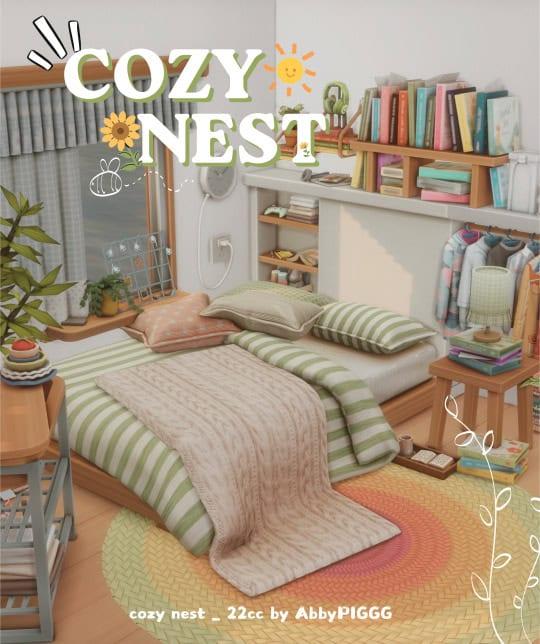
Cozy Nest is a warm and relaxed bedroom furniture set made to create lived-in spaces with plenty of gentle clutter. This set comes with 22 items, including: Note that the garment hanger requires the High School Years Expansion Pack. Make sure you download all the CC pieces from this set together because their textures are interconnected. Missing pieces may cause some textures to display incorrectly in-game. RELATED POST: 25+ Best Sims 4 Bedroom Clutter CC For Your Home
How to Install
Follow these steps to install Cozy Nest on your Sims 4 game:
- 1
Download the mod file from the link above. Sims 4 mods typically come as .package or .ts4script files.
- 2
Open your Sims 4 Mods folder. The default location is: Documents/Electronic Arts/The Sims 4/Mods
- 3
Place the downloaded file directly into the Mods folder. You can organize mods into subfolders up to one level deep.
- 4
Launch The Sims 4 and go to Game Options > Other. Make sure "Enable Custom Content and Mods" is checked.
- 5
Restart the game if it was already running. The mod should now appear in your game.
Important: Always back up your save files before installing new mods. After Sims 4 updates, mods may need to be re-downloaded or updated by the creator.
Compatibility
Platform
The Sims 4 (PC/Mac)
Requirements
- •Custom Content and Mods must be enabled in Game Options > Other
- •Script mods (.ts4script files) require "Script Mods Allowed" to be enabled separately
- •After each Sims 4 game update, some mods may need to be updated by the creator
Pro tip: If a mod stops working after a game update, check the creator's page for an updated version. Broken mods can cause the game to behave unexpectedly.
Frequently Asked Questions
More from Abbypiggg

You Might Also Like
Cozy Nest
Created by
Abbypiggg
0 ratings
downloads
favorites
views
Additional Information
Published
August 18, 2026
Source
MustHaveMods.com
Last Updated
November 15, 2026