Save this find
Create a free account and this mod is saved to your favorites.
About This Mod
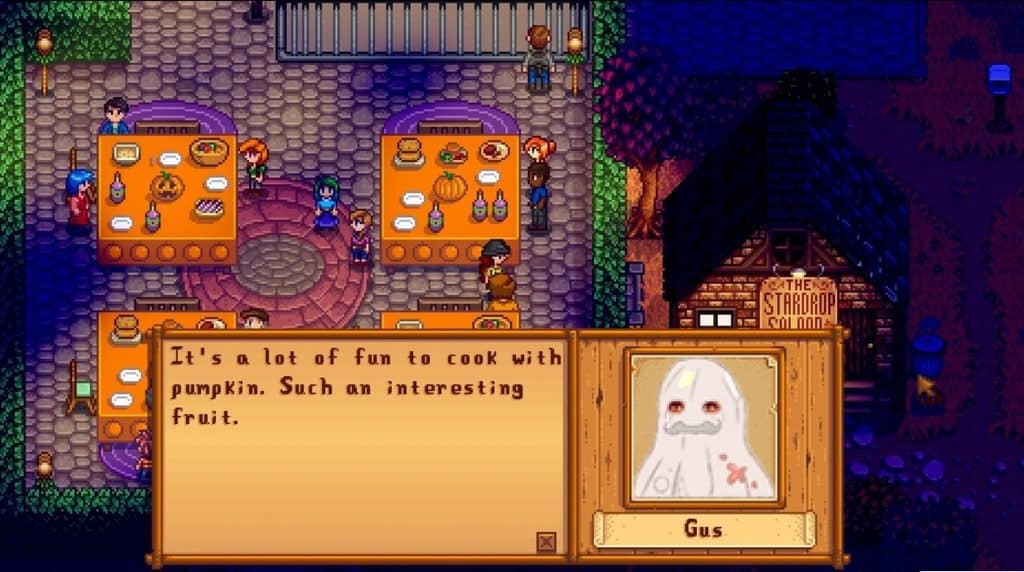
This mod was last updated on 14 January 2025 and is tagged as compatible with Stardew Valley 1.6. Spirit’s Eve Costume Pack replaces villagers’ regular portraits with Halloween costume versions inspired by their character designs. This makes it a great choice for players who want the villagers to join their farmer in dressing up. It also adds a festive touch to your conversations. The pack is intended for Spirit’s Eve, but you can leave it active to display the costume portraits throughout the year. Pair it with Halloween decorations to carry the spooky theme beyond your farm. Some characters lack costumes or certain facial expressions. The description also notes unchanged character sprites, so expect the costume changes in dialogue portraits.
How to Install
Follow these steps to install Spirit’s Eve Costume Pack on your Stardew Valley game:
- 1
Download and install SMAPI (Stardew Modding API) if you haven't already — it's required for most Stardew Valley mods.
- 2
Download the mod file from the link above. It will typically be a .zip file.
- 3
Extract the .zip file into your Stardew Valley "Mods" folder, usually located at: Steam/steamapps/common/Stardew Valley/Mods
- 4
Launch Stardew Valley through SMAPI instead of the normal launcher to activate mods.
- 5
Check the SMAPI console window when the game loads — it will confirm if the mod loaded successfully.
Important: Always back up your save files before installing new mods. Keep SMAPI updated to the latest version for the best mod compatibility.
Compatibility
Platform
Stardew Valley (PC/Mac/Linux)
Requirements
- •Requires SMAPI (Stardew Modding API) — the standard mod loader for Stardew Valley
- •Check if the mod requires Content Patcher or other framework mods
- •Verify compatibility with your Stardew Valley version
Pro tip: Some visual mods may conflict with each other. If you notice graphical issues, try disabling recently added mods one at a time.
Frequently Asked Questions
You Might Also Like
Spirit’s Eve Costume Pack
Created by
Nicole Black
0 ratings
downloads
favorites
views
Additional Information
Published
October 26, 2026
Source
MustHaveMods.com
Last Updated
October 29, 2026