Save this find
Create a free account and this mod is saved to your favorites.
About This Mod
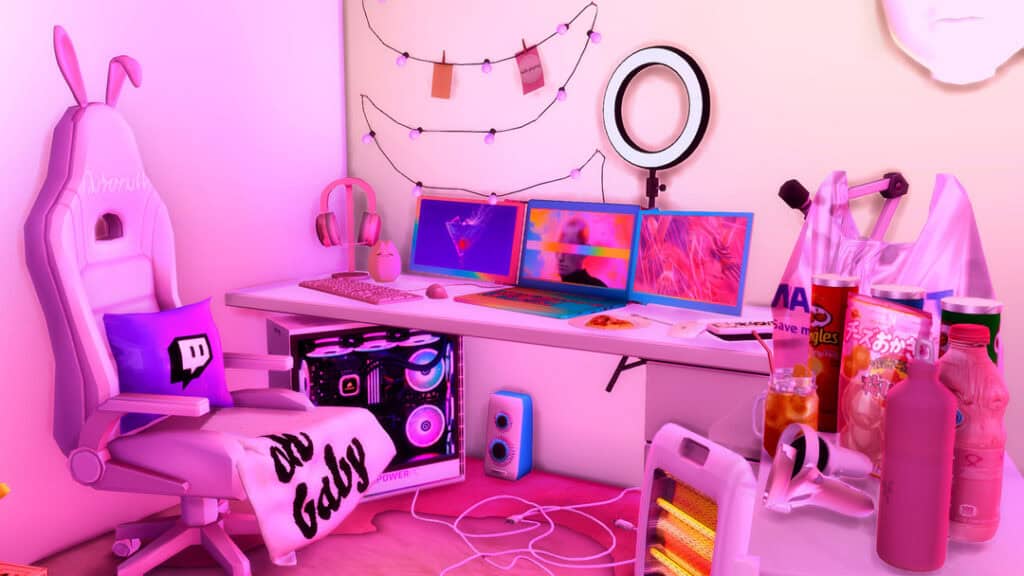
The ultra-pink Twitch Streamer Gamer Girl Room is every girl’s dream Sims 4 gaming room cc. This cozy and charming setup features multiple objects ranging from tangled electric cables and a Rubik’s Cube to a keyboard, mouse, and bag clutter consisting of snacks and drinks. You also get gorgeous sofa pillows for adding softness to your Sim’s space. Note that this is a gaming room setup built by the creator. You can either download the room and use it as it is or download the individual pieces used to create the room. You’ll find the links to all the pieces in the post’s description.
How to Install
Follow these steps to install Twitch Streamer Gamer Girl Room on your Sims 4 game:
- 1
Download the mod file from the link above. Sims 4 mods typically come as .package or .ts4script files.
- 2
Open your Sims 4 Mods folder. The default location is: Documents/Electronic Arts/The Sims 4/Mods
- 3
Place the downloaded file directly into the Mods folder. You can organize mods into subfolders up to one level deep.
- 4
Launch The Sims 4 and go to Game Options > Other. Make sure "Enable Custom Content and Mods" is checked.
- 5
Restart the game if it was already running. The mod should now appear in your game.
Important: Always back up your save files before installing new mods. After Sims 4 updates, mods may need to be re-downloaded or updated by the creator.
Compatibility
Platform
The Sims 4 (PC/Mac)
Requirements
- •Custom Content and Mods must be enabled in Game Options > Other
- •Script mods (.ts4script files) require "Script Mods Allowed" to be enabled separately
- •After each Sims 4 game update, some mods may need to be updated by the creator
Pro tip: If a mod stops working after a game update, check the creator's page for an updated version. Broken mods can cause the game to behave unexpectedly.
Frequently Asked Questions
More from LaSkrillz



You Might Also Like
Twitch Streamer Gamer Girl Room
Created by
LaSkrillz
0 ratings
downloads
favorites
views
Additional Information
Published
December 18, 2025
Source
MustHaveMods.com
Last Updated
November 17, 2026