Save this find
Create a free account and this mod is saved to your favorites.
About This Mod
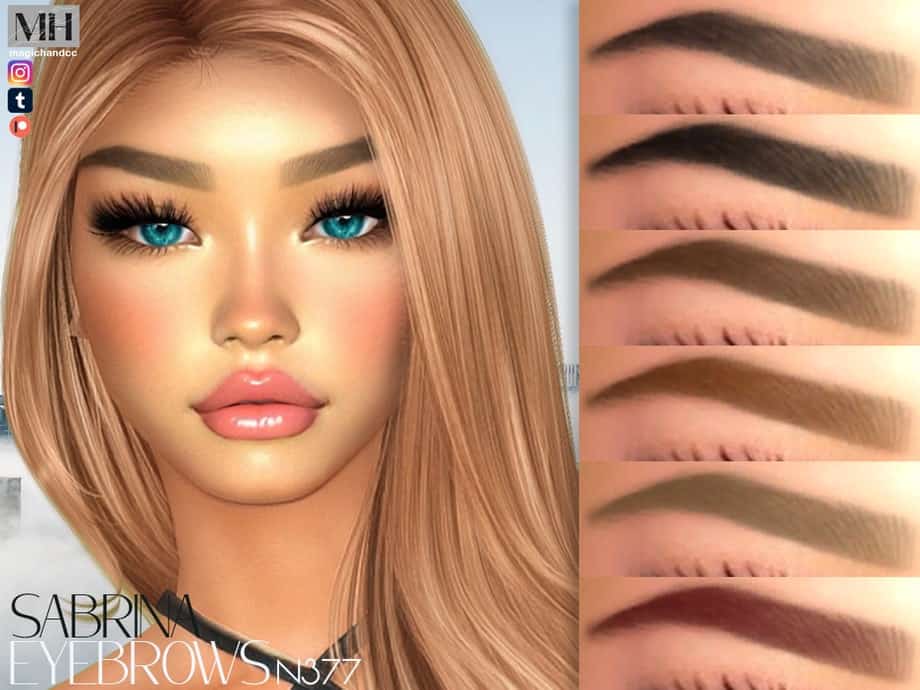
If you’re looking for bold, perfectly sculpted eyebrows that bring intensity to your Sim’s face, check out the Sabrina Eyebrows N377. These sharply angled eyebrows feature a precise arch with a sleek gradient effect, which gives them a natural and striking appearance. You’ll find them in 13 versatile shades to suit various skin shades and aesthetics. If you’re crafting a high-fashion model, consider using this cc. You can also recreate the exact look in the thumbnail, just head over to the creator’s Patreon to download the model + CCs.
How to Install
Follow these steps to install Sabrina Eyebrows N377 on your Sims 4 game:
- 1
Download the mod file from the link above. Sims 4 mods typically come as .package or .ts4script files.
- 2
Open your Sims 4 Mods folder. The default location is: Documents/Electronic Arts/The Sims 4/Mods
- 3
Place the downloaded file directly into the Mods folder. You can organize mods into subfolders up to one level deep.
- 4
Launch The Sims 4 and go to Game Options > Other. Make sure "Enable Custom Content and Mods" is checked.
- 5
Restart the game if it was already running. The mod should now appear in your game.
Important: Always back up your save files before installing new mods. After Sims 4 updates, mods may need to be re-downloaded or updated by the creator.
Compatibility
Platform
The Sims 4 (PC/Mac)
Requirements
- •Custom Content and Mods must be enabled in Game Options > Other
- •Script mods (.ts4script files) require "Script Mods Allowed" to be enabled separately
- •After each Sims 4 game update, some mods may need to be updated by the creator
Pro tip: If a mod stops working after a game update, check the creator's page for an updated version. Broken mods can cause the game to behave unexpectedly.
Frequently Asked Questions
More from MagicHand
You Might Also Like
Sabrina Eyebrows N377
Created by
0 ratings
downloads
favorites
views
Additional Information
Published
December 6, 2025
Source
MustHaveMods.com
Last Updated
June 6, 2026