Save this find
Create a free account and this mod is saved to your favorites.
About This Mod
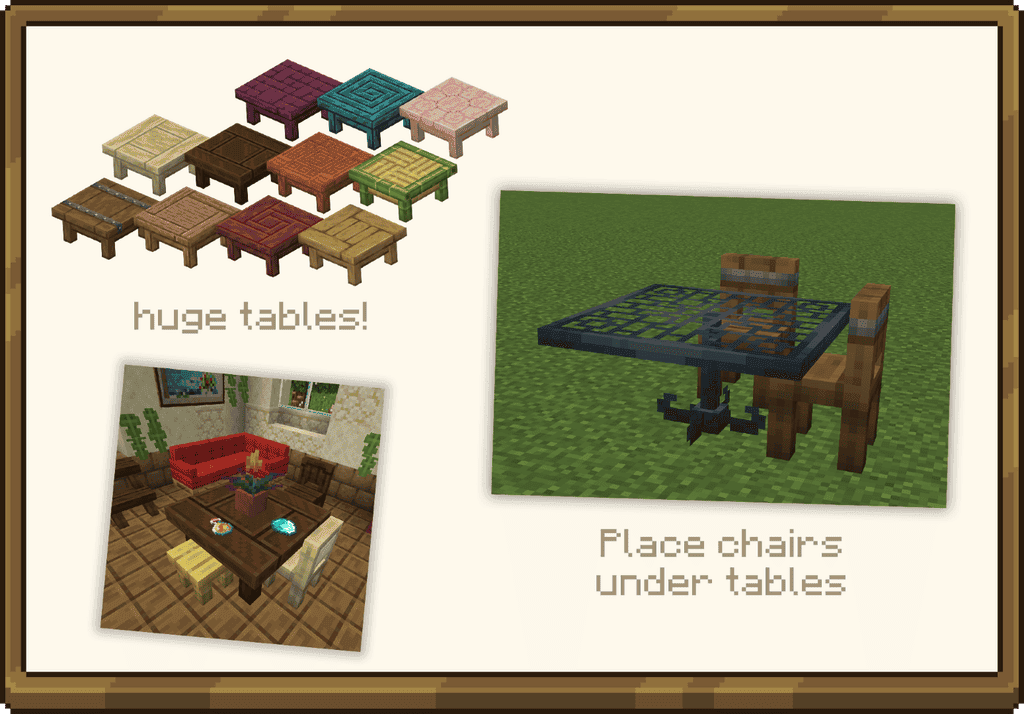
Unusual Furniture adds a wide collection of vanilla-style furniture, building blocks, and decorative props to Minecraft. You’ll find sofas, chairs, stools, benches, tables, drawers, curtains, lamps, shelves, clocks, and flower pots. Most furniture pieces are interactive, allowing you to sit on sofas and chairs. The mod offers various wood types and colors, so you can mix and match pieces to suit your builds. You can also tuck chairs underneath tables to save space or arrange sofas into comfortable seating areas. For outdoor decorations, you’ll find flower pots, plant bags, railings, and street lamps. The plant bags can even generate different plants depending on their surroundings. There are also plushies, decorative rocks, and additional building blocks to customize your spaces. This is one of the most unique Minecraft furniture mods you can add to your game.
How to Install
Follow these steps to install Unusual Furniture on your Minecraft game:
- 1
Download the mod file from the link above. Most Minecraft mods come as .jar files.
- 2
Make sure you have the correct mod loader installed — either Forge or Fabric, depending on the mod requirements.
- 3
Open your Minecraft installation folder. On Windows, press Win+R and type %appdata%\.minecraft to find it.
- 4
Place the downloaded .jar file into the "mods" folder. If the folder doesn't exist, create it.
- 5
Launch Minecraft using the correct mod loader profile and verify the mod appears in the mod list.
Important: Always back up your save files before installing new mods. Make sure your mod loader version matches the Minecraft version required by this mod.
Compatibility
Platform
Minecraft: Java Edition
Requirements
- •Requires either Forge or Fabric mod loader (check the mod description for which one)
- •May require specific Minecraft version — verify before downloading
- •Some mods have dependencies on library mods like Architectury or Cloth Config
Pro tip: Always back up your world saves before installing new mods. Mod conflicts can occasionally cause world corruption.
Frequently Asked Questions
More from Modrinth

You Might Also Like
Unusual Furniture
Created by
0 ratings
downloads
favorites
views
Additional Information
Published
November 12, 2026
Source
MustHaveMods.com
Last Updated
November 13, 2026