
20+ Best Minecraft Performance Mods to Boost FPS in 2026
Hey guys,
One of the most frustrating things about playing Minecraft is dealing with lag, FPS drops, and slow chunk loading. This can get even worse when you install multiple mods, explore new biomes, or play on crowded multiplayer servers.
Luckily, there are plenty of Minecraft performance mods you can download to improve how smoothly your game runs without sacrificing its vanilla look and feel.
I’ve rounded up some of the best options, including mods for boosting FPS, reducing memory usage, optimizing lighting, improving chunk generation, and minimizing server lag.
RELATED POST: 20+ Best Minecraft Multiplayer Mods to Download in 2026
Sodium
Download: Sodium
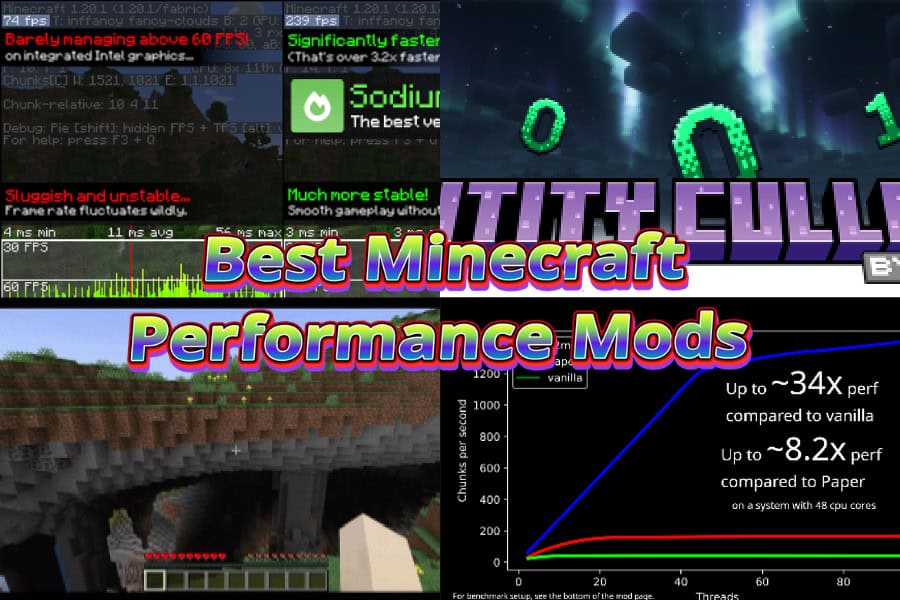
Sodium is one of the best Minecraft performance mods as it replaces Minecraft’s default rendering engine to boost FPS, reduce micro-stuttering, and fix graphical issues. It optimizes how your game renders the world without compromising the original Minecraft visuals.
In the developer’s performance comparison, Sodium increased frame rates from 74 FPS to 239 FPS on a computer with integrated Intel graphics. However, your results may vary depending on your hardware and software configuration.
Sodium supports Fabric, Quilt, and NeoForge, depending on your Minecraft version. The mod automatically applies supported optimizations to your system, so you don’t have to manually configure the settings.
To install this Minecraft performance mod, download the correct version for your mod loader and place it in your Mods folder. I recommend keeping your graphics drivers up to date to avoid crashes and rendering issues.
Lithium

Download: Lithium
Lithium is a performance mod designed to optimize several Minecraft systems, including game physics, mob AI, and block ticking, without altering vanilla gameplay mechanics. The mod reduces the workload on your processor, which can improve frame rates and make your game more responsive.
You can use Lithium in both single-player worlds and multiplayer servers. For multiplayer servers, it improves tick times, allowing your hardware to handle more loaded chunks, entities, and players.
This Minecraft performance mod supports Fabric, NeoForge, and Quilt, depending on your game version. You can use it in your existing worlds without starting a new save. I recommend pairing Lithium with Sodium to optimize both game logic and rendering performance for smoother gameplay.
OptiFine
Download: OptiFine
OptiFine improves Minecraft’s frame rates, reduces lag spikes, and provides advanced graphics settings to help you balance visual quality and performance. It also supports HD textures, shader packs, custom lighting, and animated textures.
Some of the available options include:
- Adjustable render distance
- Dynamic lighting
- FPS stabilization
- Chunk loading optimization
- Configurable animations and particles
- Custom fullscreen resolution
- Anti-aliasing and anisotropic filtering
- Connected textures and improved environmental visuals
It’s a must-have mod if you’re playing on a lower-end PC. You can disable unnecessary animations, reduce graphical details, and adjust your render distance to improve performance.
Note that some graphics settings vary depending on your Minecraft version, and enabling demanding shaders or HD textures may lower your FPS.
FerriteCore ((Neo)Forge)

Download: FerriteCore ((Neo)Forge)
FerriteCore is a Minecraft performance mod that optimizes the game’s memory usage, reducing the amount of RAM consumed. It’s particularly useful if you play on a lower-end PC or run large modpacks.
In one performance test using the Direwolf20 modpack for Minecraft 1.16.4, FerriteCore reduced memory usage on the title screen from 3.1 GB to approximately 1.1–1.2 GB. However, the amount of RAM you save depends on your modpack. Unlike rendering optimization mods, FerriteCore focuses on memory efficiency rather than directly boosting FPS.
I recommend installing this mod on both the client and server to benefit from its memory optimizations. The linked version supports Forge and NeoForge, but you can also access a separate Fabric version through the description page.
RELATED POST: 10 Best Minecraft Texture Packs to Download in 2026
ImmediatelyFast

Download: ImmediatelyFast
ImmediatelyFast is one of the best Minecraft performance mods to download in 2026. It improves Minecraft’s rendering performance by reducing draw calls and transferring data to your GPU more efficiently. It’s a lightweight optimization mod designed to work alongside other performance mods like Sodium.
The mod optimizes the rendering of:
- Entities and block entities
- Particles
- Text and signs
- Maps
- GUI and HUD elements
In one performance test involving 1,000 cows on screen, ImmediatelyFast increased frame rates from 16 FPS to 60 FPS without additional optimization mods. Players with slower processors may experience more noticeable improvements.
This Minecraft performance mod supports Fabric, Forge, NeoForge, and Quilt. Note that ImmediatelyFast is incompatible with OptiFine, OptiFabric, and most closed-source clients, including Lunar Client and LabyMod.
Entity Culling

Download: Entity Culling
Entity Culling improves your FPS by preventing Minecraft from rendering entities and block entities hidden behind walls, ceilings, and other obstacles. It uses spare CPU threads to calculate what’s visible to you in real time, reducing unnecessary rendering processes.
The mod is particularly useful when exploring crowded villages, large builds, or areas with numerous mobs since it doesn’t interfere with mob behavior, spawning, or farming mechanics.
Note that Entity Culling works alongside Sodium and only requires installation on the client side. It supports Fabric, Forge, and NeoForge for compatible Minecraft versions.
However, there are a few things to watch out for:
- Some magic mods may experience animation issues.
- Vanilla beacons, Create pulleys, and certain Botania blocks may require whitelisting in the configuration menu.
- Older computers with overloaded processors may experience limited performance improvements or even lower FPS.
- Several older Minecraft versions no longer receive official support.
You can assign a debug key in the controls menu to toggle the mod on and off and compare your FPS without restarting Minecraft.
ModernFix

Download: ModernFix
ModernFix offers an all-in-one approach to improving Minecraft’s performance. It reduces RAM consumption and resolves various bugs without significantly altering vanilla gameplay. It’s particularly useful for players who run large modpacks on lower-end computers with limited RAM.
Some of its key improvements include:
- Faster game startup and loading times.
- Reduced memory consumption.
- Bug fixes for older Minecraft versions.
- Fewer random crashes during startup.
- Debugging tools for identifying the causes of game crashes and freezes.
- An optional dynamic model-loading system to further reduce memory usage.
According to the official description, many Forge modpacks running Minecraft 1.16 to 1.19.2 can launch roughly twice as fast with ModernFix installed.
You can pair this Minecraft performance mod with FerriteCore, Sodium, or Embeddium for additional optimizations. However, OptiFine isn’t officially supported and may cause compatibility issues. Also, the dynamic model-loading option is disabled by default due to potential mod conflicts.
Embeddium

Download: Embeddium
Embeddium is a Minecraft performance mod designted to improve the game’s rendering performance using Sodium’s codebase alongside additional optimizations, bug fixes, and better mod integration. The mod helps improve frame rates and provides smoother gameplay, so it’s an excellent choice for players who use large modpacks.
Some of its key improvements include:
- A rewritten terrain rendering system.
- Improved rendering of entities, block entities, and graphical interfaces.
- Integrated Fabric Rendering API support.
- Additional bug fixes for improved mod compatibility.
- Optional translucency sorting through the Video Settings menu.
This Minecraft performance mod is available for Forge, Fabric, and NeoForge, depending on your game version. Note that Indium is incompatible with Embeddium, so remove it from your Mods folder before installing this mod.
Dynamic FPS
Download: Dynamic FPS
Dynamic FPS is one of my favorite Minecraft performance mods. It works by reducing Minecraft’s resource consumption when the game is running in the background, minimized, or idle. It automatically detects the state of your Minecraft window and allows you to adjust frame rates, volume, and in-game notifications accordingly.
You can also configure these settings when your laptop is running on battery power and display your current battery status on the in-game HUD. I recommend using this Minecraft performance mod if you multitask or play on low-end computers, as it reduces unnecessary CPU usage and can help conserve battery life.
You’ll need to install Mod Menu and Cloth Config to access the in-game configuration screen on Fabric.
Note that enabling battery integration requires the mod to download an additional library while running. Dynamic FPS verifies the downloaded files before using them. You can disable this option in the mod’s settings or install the library manually.
More Culling

Download: More Culling
More Culling improves Minecraft’s performance by optimizing how the game handles different types of culling. It prevents the game from rendering objects and surfaces outside the player’s view, reducing unnecessary graphical processing.
This can help increase your FPS and reduce the workload on your system, resulting in smoother gameplay. You’ll need to install Cloth Config for this Minecraft performance mod to work.
Head over to the wiki linked in the description for more information on culling optimizations, performance improvements, compatibility, and bug fixes.
Krypton
Download: Krypton
Krypton is a performance mod designed to optimize Minecraft’s networking system and improve how the game processes and transfers data between clients and servers. It reduces unnecessary CPU and memory usage, making it particularly useful for multiplayer servers.
Some of its key optimizations include:
- Improved network data processing.
- Reduced server CPU usage.
- Lower server tick times.
- Reduced memory consumption.
- Faster packet serialization.
This Minecraft performance mod is available for Fabric and is designed to work alongside Sodium, Lithium, and Fabric API. Although it supports different operating systems, it’s specifically optimized for Linux.
Note that Krypton doesn’t guarantee stability or compatibility with every mod or modpack. Updates are released on an as-needed basis, and technical support is limited.
Concurrent Chunk Management Engine (Fabric)
Download: Concurrent Chunk Management Engine (Fabric)
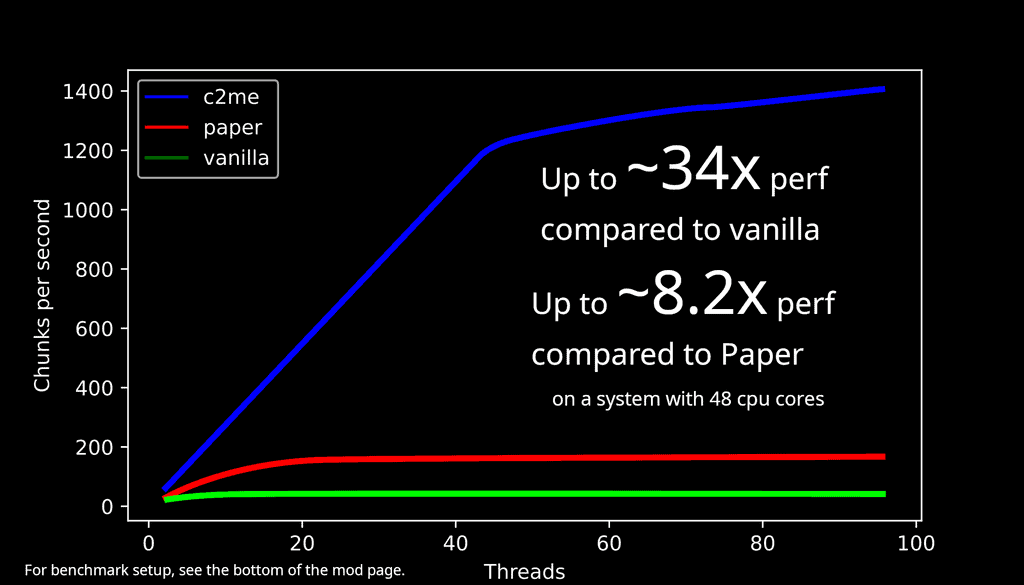
Concurrent Chunk Management Engine, also known as C2ME, improves Minecraft’s chunk generation, loading, and data handling by utilizing multiple CPU cores simultaneously. This allows the game to process chunks more efficiently, reducing delays when exploring new areas or generating large worlds.
The mod preserves vanilla gameplay mechanics and supports world-generation datapacks compatible with vanilla Minecraft. However, you may encounter compatibility issues with certain custom world-generation mods.
For optimal performance, consider using C2ME alongside Lithium and ScalableLux. I also recommend backing up your worlds before installing this Minecraft performance mod.
Here’s the support status for Minecraft versions:
- Latest releases and snapshots: Fully supported.
- Older releases: Receive critical bug fixes through long-term support.
- Older snapshots: No longer supported.
Ensure you download the appropriate mod version for your game.
BadOptimizations

Download: BadOptimizations
BadOptimizations is a modpack that introduces a collection of small optimizations to improve Minecraft’s overall performance. Unlike mods primarily focused on rendering, this mod targets unnecessary background calculations and processes to reduce the workload on your system.
Some of its optimizations include:
- Preventing unnecessary lighting updates when block brightness remains unchanged.
- Skipping debugging processes when they’re not needed.
- Simplifying sky color calculations in Minecraft 1.21.10 and earlier.
- Caching certain calculations to avoid repetitive processing.
You can disable individual optimizations through the configuration file if you encounter compatibility issues with other mods.
Note that the FPS improvements vary depending on your hardware and game setup.
Enhanced Block Entities

Download: Enhanced Block Entities
Enhanced Block Entities improves Minecraft’s performance by replacing resource-intensive block entity models with more efficient baked block models. This helps reduce FPS drops without sacrificing existing animations.
The mod also introduces several visual improvements, like smoother lighting, customizable block models, and increased block entity visibility over long distances.
It optimizes the following block entities:
- Chests and Ender Chests
- Signs
- Bells
- Beds
- Shulker Boxes
- Decorated Pots
This Minecraft performance mod is particularly useful for players with large storage rooms containing numerous chests.
Note that this is a client-side mod and requires Fabric API to function. Enhanced Block Entities v0.10.2 and above works with Sodium 0.6 and later without Indium.
If your chests become invisible due to resource pack conflicts, enable the “Force Resource Pack Compatibility” option under Block Entity Settings.
Clumps

Download: Clumps
Clumps is another performance mod designed to improve the game by combining multiple experience (XP) orbs into a single entity. This reduces lag when large quantities of XP orbs accumulate in a small area.
The mod also allows players to collect XP orbs immediately upon contact instead of having numerous orbs floating around them.
I recommend using this Minecraft performance mod if you operate large mob farms or XP grinders. Note that for Minecraft 1.17 and newer, you only need to install the mod on the server side. For older Minecraft versions, you must install it on both the client and server sides.
Alternate Current

Download: Alternate Current
Alternate Current is designed to reduce lag caused by redstone dust by optimizing power calculations and eliminating unnecessary block updates. Instead of repeatedly calculating power levels for individual wires, the mod processes the entire redstone network before updating its power levels.
This approach makes redstone operations more efficient and predictable while preserving most vanilla functionality.
According to the mod’s description, Alternate Current can reduce the contribution of redstone dust to milliseconds per tick (MSPT) by up to 30 times. This Minecraft performance mod is particularly useful for players who build automated farms, sorting systems, and complex redstone contraptions.
Note that some contraptions relying on vanilla redstone’s specific block update order may behave differently. The mod supports both single-player worlds and server-side installation.
ServerCore

Download: ServerCore
ServerCore is a free mod that improves Minecraft server performance by optimizing various internal processes and reducing random lag spikes. The mod works on both dedicated servers and single-player worlds, making it useful for solo and multiplayer gameplay.
Some of its optimization options include:
- Improved chunk ticking, mob spawning, and player logins.
- Reduced number of entities the server needs to process.
- Automatic adjustment of view and simulation distances based on server performance.
- Reduced lag from villagers in large trading halls.
- Customizable mob spawning rates and population limits.
- Breeding caps to prevent overcrowding in animal farms.
Note that ServerCore disables most options affecting vanilla gameplay by default. To achieve better performance, you can customize the config.yml and optimizations.yml files in the config/servercore folder.
Very Many Players (Fabric)

Download: Very Many Players (Fabric)
Very Many Players (VMP) is one of the most essential Minecraft performance mods to download in 2026. It improves Minecraft server performance when a large number of players are online while aiming to preserve vanilla gameplay. It’s an excellent choice for players hosting busy multiplayer servers.
Some of its performance improvements include:
- More efficient entity tracking and collision processing.
- Optimized player lookups and network packet transmission.
- Improved chunk sending mechanisms.
- Individual render distances at the network packet level.
- Improved network responsiveness.
- Optimized fluid state lookups and ingredient matching.
For the best performance, use this Minecraft optimization mod alongside Lithium.
Note that VMP is still in early development, so you may encounter bugs or stability issues. You can report any problems through the issue tracker linked in the mod’s description. Minecraft Mod
ScalableLux
Download: ScalableLux
ScalableLux improves Minecraft’s lighting engine to process light updates more efficiently. The mod builds upon Starlight, which stopped receiving updates in March 2024, and incorporates its performance improvements alongside additional bug fixes.
It also offers optional parallel light updates, allowing the game to process multiple lighting calculations simultaneously. This improves performance during rapid world generation and in areas with frequent lighting changes.
This Minecraft performance mod is particularly useful for dedicated servers with large player populations, where multiple players generate new chunks simultaneously.
FastQuit

Download: FastQuit
FastQuit allows you to return to Minecraft’s title screen while your single-player world continues saving in the background. Normally, you have to wait for the entire saving process to finish, but this mod bypasses that so you can access your world list and even edit, delete, or recreate worlds.
The mod also offers several customizable options, including:
- Notifications when a world finishes saving.
- Background thread priority adjustments.
- An optional saving world screen.
- Displaying the time it takes to save a world.
Note that FastQuit doesn’t always make exiting a world instantaneous, especially when playing with high render distances. You can configure this Minecraft performance mod through Mod Menu or by editing the fastquit-config.txt file in your Minecraft configuration folder.
Particle Core

Download: Particle Core
Particle Core improves Minecraft’s performance by optimizing how the game generates and renders particles. It uses particle culling to prevent the game from rendering particles outside your field of view, reducing unnecessary processing.
Some of its key optimizations include:
- Improving the rendering efficiency of visible particles.
- Reducing the spawn rate of specific particle types.
- Completely disabling potion particles.
- Fine-tuning vanilla particle settings.
- Disabling all client-side particle spawning.
Unlike resource packs designed to make particles invisible, Particle Core prevents unwanted particles from spawning altogether, helping reduce lag and improve performance.
This Minecraft performance mod is compatible with Sodium, and you can customize or disable individual optimizations through its configuration file.
FAQ on Minecraft Performance Mods for FPS
1. What are Minecraft performance mods?
Minecraft performance mods optimize different aspects of the game to improve FPS, reduce lag, lower memory consumption, and make gameplay smoother.
2. What is the best Minecraft performance mod for boosting FPS?
Sodium is one of the best options for boosting FPS because it optimizes Minecraft’s rendering engine and reduces unnecessary graphical processing.
3. Can Minecraft performance mods help low-end PCs?
Yes. Performance mods can reduce the strain on your computer’s CPU, GPU, and RAM, making Minecraft more playable on lower-end systems.
4. Can I use multiple Minecraft performance mods at once?
Yes. You can combine mods like Sodium, Lithium, and FerriteCore to optimize different aspects of the game. However, avoid combining mods with conflicting optimizations.
5. Do Minecraft performance mods change the game’s graphics?
Most performance mods preserve Minecraft’s vanilla appearance. However, some allow you to reduce particles, adjust rendering distances, or disable certain visual effects for better performance.
6. Which Minecraft mod reduces RAM usage?
FerriteCore helps reduce Minecraft’s memory consumption, making it particularly useful for players with limited RAM or large modpacks.
7. Which Minecraft performance mods improve chunk loading?
Concurrent Chunk Management Engine (C2ME) improves chunk generation and loading by distributing processing tasks across multiple CPU cores.
8. Can performance mods reduce lag on Minecraft servers?
Yes. Mods like ServerCore, Very Many Players, and Alternate Current optimize server-side processes to reduce lag and improve multiplayer performance.
9. Do Minecraft performance mods work with shaders?
Some performance mods work alongside shaders. For example, you can combine Sodium with Iris Shaders to improve rendering performance while using shader packs.
10. What is the difference between FPS lag and server lag in Minecraft?
FPS lag causes choppy visuals and stuttering, while server lag causes delayed actions, unresponsive mobs, and slow block interactions.
11. Can Minecraft performance mods reduce lag caused by mobs and entities?
Yes. Mods like Entity Culling reduce unnecessary entity rendering, while ServerCore offers configurable options to reduce entity processing on the server.
12. Why is my Minecraft still lagging after installing performance mods?
Your game may still lag due to insufficient RAM, demanding shaders, high render distances, conflicting mods, outdated drivers, or hardware limitations. Try lowering your graphics settings and adjusting your mod configurations.
Conclusion
That’s it for my roundup of the best Minecraft performance mods to download in 2026. From FPS boosters and memory optimizers to chunk-loading improvements and server optimization tools, there are plenty of ways to make your game run more smoothly.
I recommend starting with a few essential optimization mods before gradually adding others based on your performance needs. Remember to back up your worlds before installing new mods or changing their configuration settings.